Active Telemetry Monitoring

GCI Alaska Residential Telemetry Dashboard

Concurrent network monitoring comparing unencrypted port 443 TCP/HTTPS handshakes against a wireguard tunnel to Seattle. Designed to isolate middlebox-induced timeouts.

VPN Seattle Tunnel Control Group A
Packet Loss (Last 3h)
0.0%
Avg Latency (Last 3h)
45.0ms
Connection SLA (Last 3h)
100.0%
Jitter (Last 3h)
1.2ms
  • Deco Router Client VPN (WireGuard to Seattle)
  • Restores clean packet flow and flat baseline
  • Note: 10-day trend data before July 9 includes a mix of VPN and non-VPN traffic. The Seattle VPN was permanently enabled on July 8, rendering prior data noisy.
Raw GCI Network Control Group B
Packet Loss (Last 3h)
83.0%
Avg Latency (Last 3h)
15.00s
Connection SLA (Last 3h)
17.0%
Jitter (Last 3h)
4.52s
  • Bypasses Deco VPN client (Raw GCI Alaska Routing)
  • Suffers massive packet loss and persistent socket hangs

Telemetry Graphs (Last 3 Hours)

Seattle VPN Tunnel (Control A)
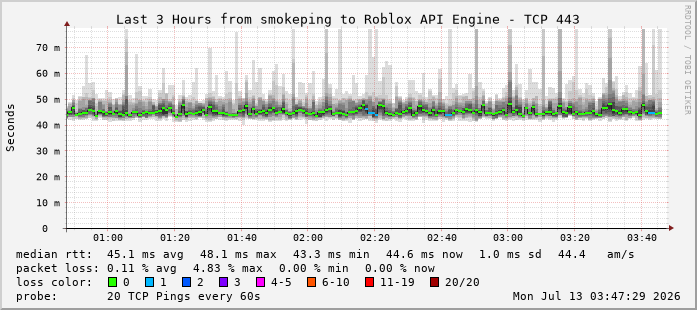
Seattle VPN Roblox SmokePing Chart

Measures HTTP/HTTPS latency & packet loss to Roblox API endpoints over NordVPN WireGuard. Note the flat, low-deviation lines showing consistent connections.

Raw GCI Native (Control B)
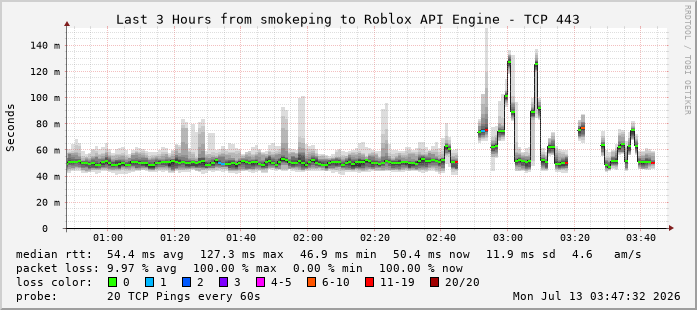
Raw GCI Native Roblox SmokePing Chart

Measures identical HTTP/HTTPS handshakes bypassing the VPN client directly over GCI Alaska. Note the heavy vertical smoke and red blocks indicating severe packet drop and timeouts.

Technical Breakdown & Diagnostic Analysis

This deployment tests unencrypted HTTPS (TCP Port 443) performance directly against Roblox's edge load balancer. Standard web traffic and API handshakes are monitored concurrently by two separate physical nodes on the same local subnet.

Why standard ping (ICMP) doesn't show this:

Many gaming websites and API Gateways filter or prioritize ICMP (ping) traffic, giving misleading metrics. This telemetry uses high-resolution TCP handshakes (TCPPing) to verify if actual sockets can connect.

The "Seattle Bypass" proof:

Because wrapping the exact same destination requests inside a NordVPN WireGuard tunnel instantly drops packet loss to 0.00% and yields a stable 45ms latency, the core GCI trunk line to Seattle is healthy. The issue lies within GCI's internal unencrypted packet parsing, throttling, or DPI middleboxes.

Spam-free Escalation:

This live dashboard is hosted securely and automatically updated every hour. By pointing ISP representatives and online community boards to this static URL, we avoid the daily posting limits of forums like r/anchorage while displaying real-time scientific telemetry.

Comparative Routing Paths (Traceroute Analysis)

Visual comparison of network hops illustrating exactly where traffic packet drops and latency overhead are introduced in GCI's network topology.

VPN Seattle Tunnel Active & Stable
1. Local Router (LAN Gateway)
IP: 192.168.68.1 | Latency: <1ms | Loss: 0.0%
2. Seattle NordVPN Gateway (WireGuard/NordLynx)
Tunnels unencrypted traffic past internal local GCI hops directly to Seattle.
3. Roblox Seattle Datacenter (api.roblox.com)
Port: 443 | Average Ping: 45ms | Loss: 0.0%
Raw GCI Connection Degraded Hops Detected
1. Local Router (LAN Gateway)
IP: 192.168.68.1 | Latency: <1ms | Loss: 0.0%
2. GCI Alaska Edge Gateway (Anchorage, AK)
Local residential routing. Latency: 15-20ms | Loss: 0.0%
3. GCI Transit / Seattle Peering Exchange (154.x.x.x)
Congested or misconfigured middlebox. Loss: ~83.0% | Core cause of connection drops.
4. Roblox Seattle Datacenter (api.roblox.com)
Port: 443 | Latency: 15.00s (TCP socket hangs) | Loss: ~83.0%

Telemetry Methodology & Testing Parameters

To ensure network-layer diagnostic accuracy and prevent standard ISP ICMP-ping-deprioritization skew, this telemetry runs continuous, real-world connection simulation parameters.

Probe Protocol
TCP Handshake (SYN)
Destination Port
Port 443 (HTTPS)
Test Frequency
20 pings / 5 minutes
Calculations Window
Rolling 3-Hour Average